
TL;DR: I rebuilt kate & tom’s, a 400+ property holiday cottage site, from Advanced Custom Fields flexible content into a native WordPress block theme. The client can now build pages from patterns instead of waiting on me to code a new widget every time. The hard part was migrating 10,590 widgets out of post meta and into blocks, which I did with a purpose-built plugin re-run against fresh production snapshots throughout development. I trained the team using WordPress Playground so they could break things safely, and even before any tuning the new block theme already outscores the old classic theme on PageSpeed. It took sixteen months because the site is genuinely that complex, and it was a one-man job. Checkout the WordPress blocks migration here.
Last week I launched a site for kate & tom’s, a luxury cottage holiday company with houses dotted right across the UK. Over 400 of them, in fact, each one pulling its own live availability from a third-party booking API. That’s not a small site by anyone’s measure, and it’s taken sixteen months to get here. I want to explain why.
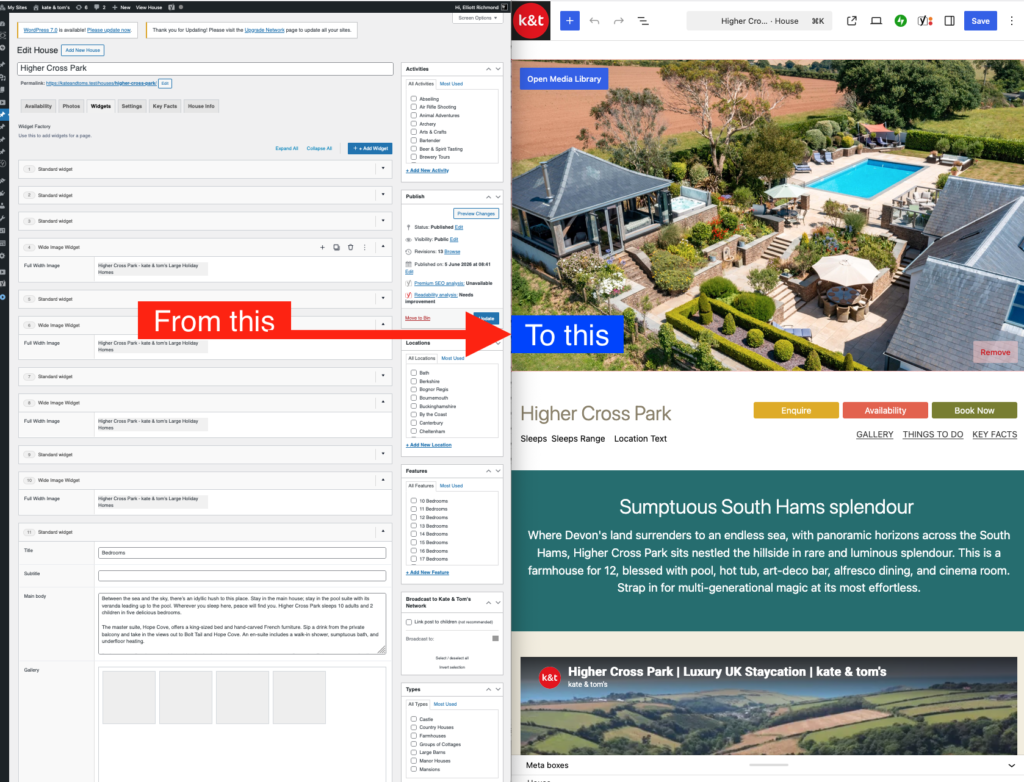
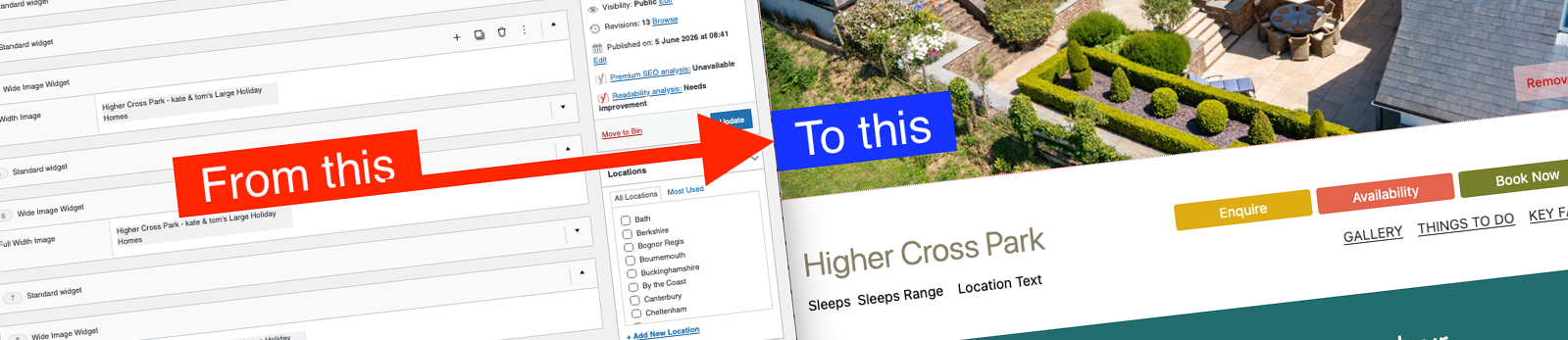
That’s the shift in one picture. On the left, the old backend: a stack of form-based ACF widgets the client filled in field by field. On the right, the same house rendered from native blocks in a modern block theme. Getting from one side of that arrow to the other, 400-odd times over, is what this post is about.
The old site worked, it just didn’t work for them
The previous build was Advanced Custom Fields flexible content, and to be fair to it, flexible content did its job for years. The client could drop widgets onto a page and build something reasonably varied without touching code.
The catch was what happened when they wanted a new type of widget. That meant coming to me. I’d have to build the logic behind it, test it across desktop and mobile, then deploy it before they could actually use the thing. For a marketing team that wanted to move quickly, that’s a real blocker, and it was the main reason for moving to a block theme.
What the site actually is
Each of the 400+ houses has its own landing page, with child pages underneath it for availability, key facts, book now, and a gallery. That parent-child structure alone gives you a sense of the scale, but the taxonomy behind it is where it gets properly hairy. Locations run to 62 terms. Activities sit at 109. Sizes cover 16 options, types 7, occasions 30. Features alone come in at 73 terms, which is the kind of number that makes you double check you’ve read it right.
On top of that there’s an enquiry form wired up per house, so the marketing team can actually see where enquiries are coming from across the whole portfolio rather than one big anonymous inbox. And then there’s the booking calendar itself, where a visitor picks a couple of dates and gets shown available periods around them, all pulled live from the third-party API. None of that is decorative. It’s the stuff that actually earns the client money.
Blocks over widgets
The move to a modern block theme was about handing that flexibility back to the client. Instead of asking me for a new widget every time marketing wants to try something, they can now build pages themselves from a library of patterns, no development time required. That’s the whole point of the block editor when it’s set up properly. It’s not just a nicer interface, it removes a dependency that was slowing them down.
The migration itself was the hard part
Here’s the bit that ate most of the sixteen months. All that old flexible content lived in post meta, and none of it transfers to blocks on its own. And there was a lot of it. When I actually counted, there were 10,590 widgets across all the houses, an average of 25.9 per house, with 401 houses carrying 21 or more each. Every one of those had to end up as a block.
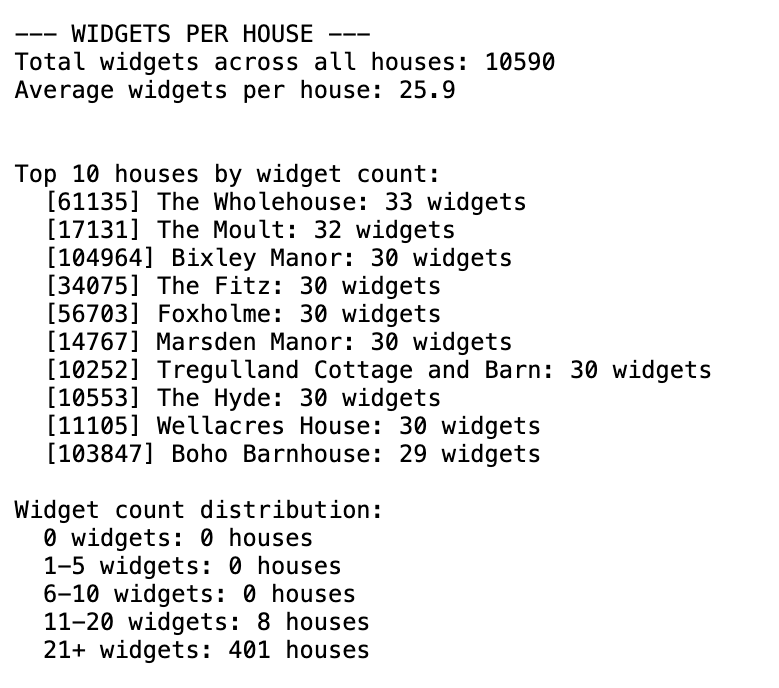
Numbers like that are exactly why manual conversion was never on the table. You don’t hand-edit ten and a half thousand widgets. So the job split into two stages.
First, I had to build a library of block patterns that matched every existing ACF widget, one for one. Only once those existed could I even start on the second stage, which was writing a migration script to convert the actual content, pulling everything out of post meta and rebuilding it as post content in blocks.
I won’t pretend it was clean. Some of that conversion came out flaky, and a chunk of pages needed manual fixing afterwards because of how the block editor parses and serialises content. Get the innerHTML and innerContent even slightly out of step and the editor throws up its “Attempt Block Recovery” prompt, which is the sort of thing that eats an afternoon. That’s the honest version of events, not the tidy one. Given the size of the site, I think sixteen months is a fair reflection of the actual work rather than scope creep, but it’s still a long time to be inside one project.
I wrote up the technical side of all this in far more depth about a year ago, back when I was first getting my head around it, including the pattern-based approach and the Pattern_Handler class that does the heavy lifting. If you want the code-level version of this story, that case study is here.
Worth a note if you read that earlier piece: back then I put the scale at roughly 200 house listings and 500 widgets. That was an early estimate before I’d properly audited the data, and it turned out to be a fair way short. The real figures were 400-plus houses and over ten thousand widgets. That gap is a lesson in itself, really. Until you actually count, you’re guessing, and migration guesses tend to run low.
The migration ran as a plugin, in a fixed order
All of that logic lives in a dedicated plugin I built just for this job, rather than a throwaway script. The reason it’s a proper plugin is that I ran it over and over throughout development, not once at the end.
Here’s the wrinkle a lot of migration write-ups skip. Development ran for months, but the real site was live the whole time, and its data kept moving. Special offer dates rolled into the past, availability changed, content got tweaked. If I’d worked from a single old export, the migrated site would have drifted further from reality every week.
So the workflow was to take periodic snapshots of the live production database, pull each one down locally, and then re-run the whole migration against fresh data. A shell script handled the sequence, refreshing the local database and then firing each migration function in order through WP-CLI eval calls. Roughly, it goes like this:
- Build the page header banner and title widgets
- Convert the house photo galleries
- Set the thumbnail featured images
- Clean up the existing house sub-pages
- Run the main widgets-to-patterns conversion across all houses
- Rebuild the house sub-pages (availability, book details, calendar)
- Wire the availability calendar up to the booking API
- Append the galleries and key facts to their pages
- Add the seasonal and availability header banners
- Stamp the signature styling across the sub-pages
Order matters here. You can’t append galleries to sub-pages that haven’t been rebuilt yet, and you can’t wire up a calendar before the book details page exists. Each step assumes the one before it has already run, which is exactly why it lives in a script rather than being fired by hand. Refresh the database, run the script, and a few minutes later you’ve got an up-to-date migrated site to test against. That repeatability is the thing that made a sixteen-month migration survivable.
Training the client without the fear of breaking anything
Once the new site was ready, there was still a training problem. Five or six people at kate & tom’s needed to get comfortable with the block editor, having only ever known the old widget system. For that I used WordPress Playground and a Blueprint that loaded their actual theme, plugin, and a slice of their real content into a disposable, in-browser WordPress instance. If they broke something, a refresh put it straight back. I’ve written about how that setup works in more detail in wordpress-playground-blueprints-client-training, so I won’t repeat it here, but it turned out to be one of the best training tools I’ve used with a client.
An early word on performance
Here’s something I didn’t go looking for but was pleased to see. I ran the new site through Google PageSpeed Insights and compared it to a snapshot of the old classic theme from October 2022.
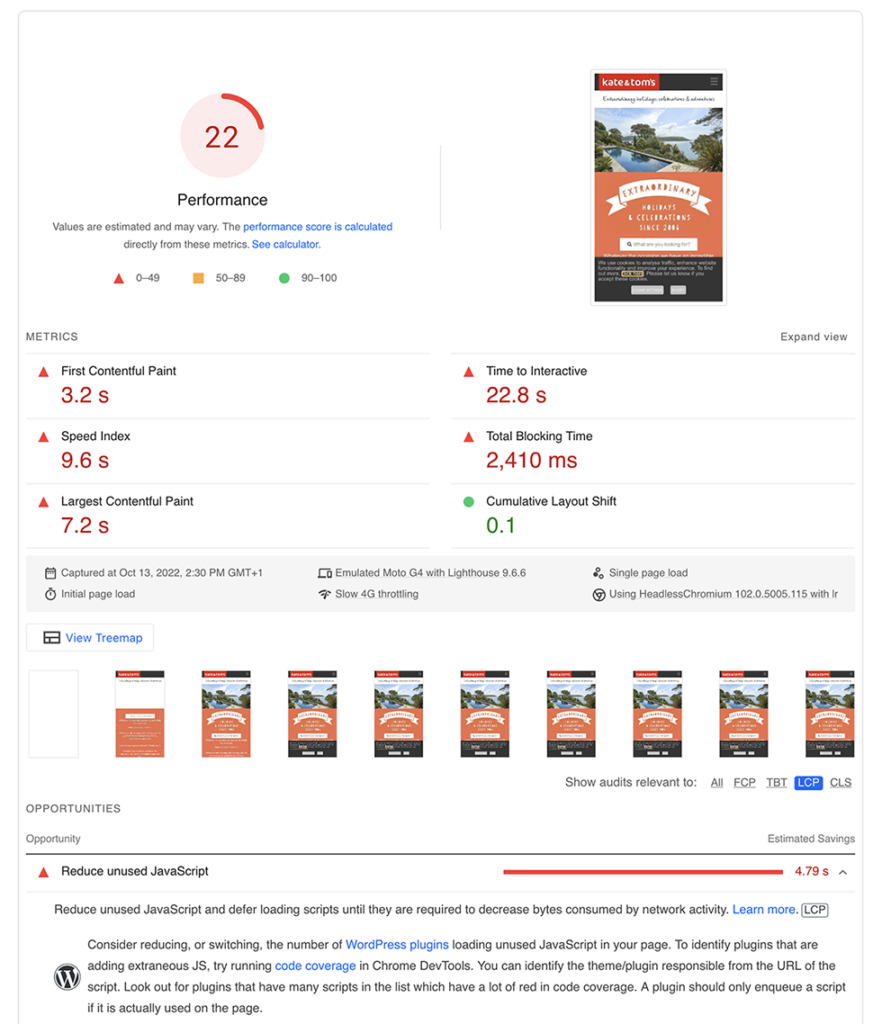
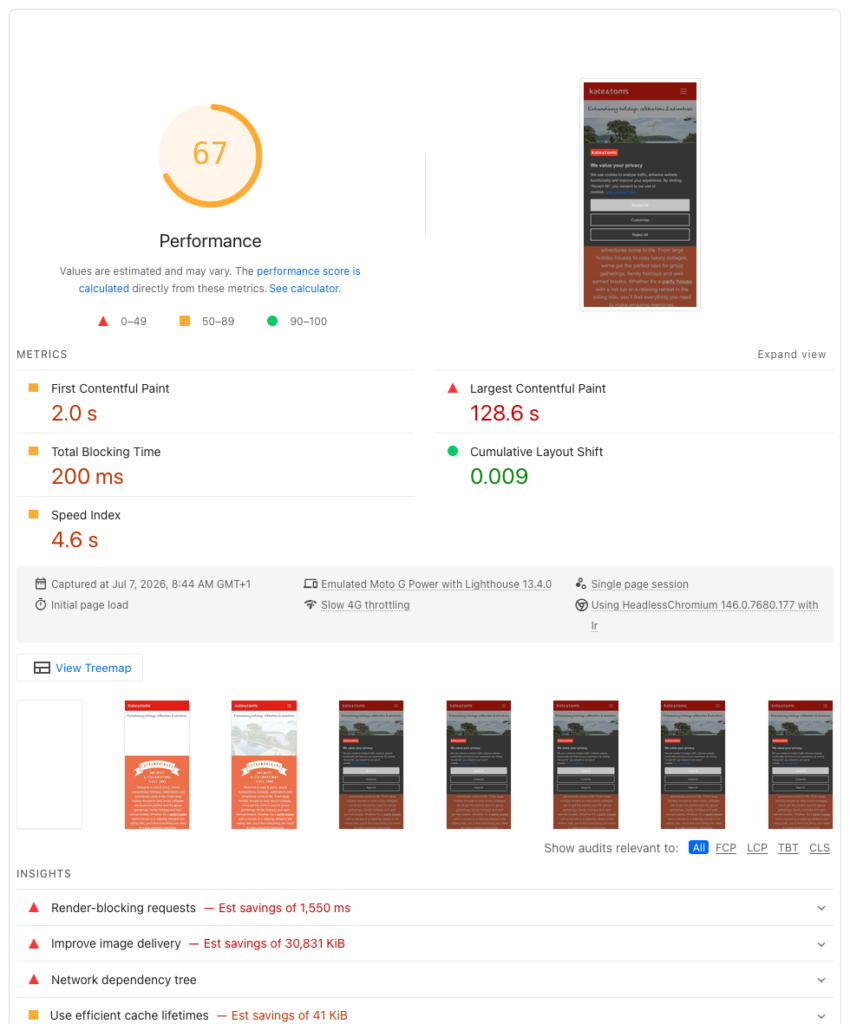
The old theme scored 22. The new block theme scores 67 straight out of the gate. Total Blocking Time went from a painful 2,410ms down to 200ms, First Contentful Paint dropped from 3.2s to 2.0s, and Cumulative Layout Shift went from 0.1 to basically nothing at 0.009. For a straight conversion with zero performance work done on the new site yet, that’s a genuinely good starting point.
Now, I want to be honest about what this is and isn’t. It’s not an acid test. The two snapshots were captured four years apart, on different emulated devices, using different versions of Lighthouse, so it’s a rough comparison rather than a controlled one. And that 128.6s Largest Contentful Paint figure on the new report is obviously nonsense, almost certainly a measurement artefact from a lazy-loaded hero image or the cookie banner tripping up the test, not a real load time. I’ll be digging into that.
So take it for what it is. A modern block theme, before any tuning, comfortably outperforming the old classic theme it replaced. That’s the pattern I’d expect, and there’s plenty more to claw back once I actually sit down and optimise it.
Was it worth sixteen months?
The client is genuinely pleased with it, and so am I, mind. I got a bottle of bubbly out of the launch, which never happens, so that tells you something. Here’s how one of the team put it:
It’s been a long awaited and exciting upgrade and, despite being a little nervous about using the new backend, I have found it extremely straightforward to get used to already. It offers so many more features and capabilities than the old site and it’ll enable us to streamline a lot of our day-to-day tasks and progress with long-awaited upgrades to how the website looks and functions. Thank you!
That “nervous about the new backend” bit is exactly why the Playground training mattered. The whole job is only a win if the people using it every day feel confident, not just the developer who built it. I shared that before-and-after shot on X when it launched, and there’s a proper video coming on my YouTube channel walking through the ACF-to-blocks migration approach in more depth, because I think it’s a route more agencies are going to need soon whether they like it or not.
If you’re still running a client site on Advanced Custom Fields flexible content and every new layout idea means booking in development time, it’s worth asking whether the block editor could take that job off your plate. I’ve written more about the block theme side of things over on my site.
Leave a Reply